COPY CODE SNIPPET

All contents

Thursday, 16 November 2017

Hackers Can Use Your Antivirus Software To Spread Malware

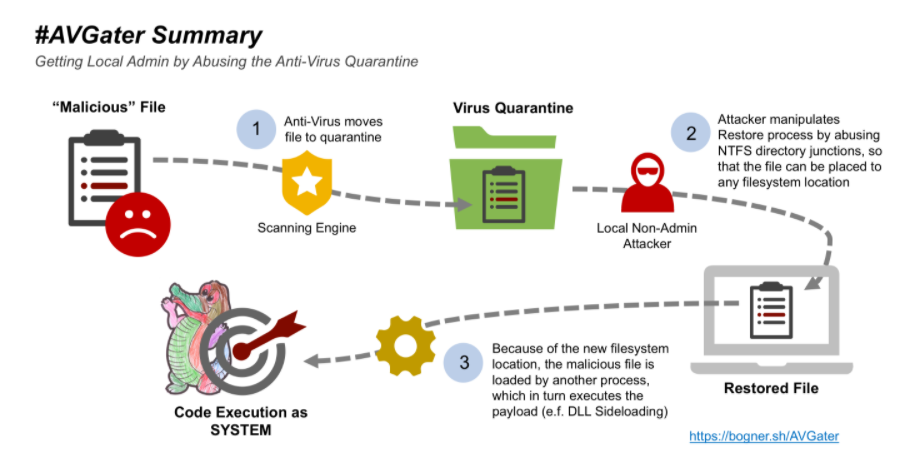
AVGator resotre quarantine files
How do you safeguard your computer from malicious stuff, by using an antivirus software? But what if the protector of your digital friend can’t be trusted?
A new exploit called AVGator is created by an Austra-based security consultant named Florian Bogner. Many AV software provide functionality to quarantine files, but the users can restore the quarantined files whenever they want.
Using AVGator to mishandle the ‘restore from quarantine’ feature can allow a local user to gain full control of a computer. In normal cases, a user without admin privileges can’t perform write operations in “C:\Program Files or C:\Windows folders.
AVGator exploit to hack antivirus
AVGator allows the users to do so by abusing a Windows NTFS directory junctions. Thus, a user can restore quarantined malicious files to a new location, even sensitive ones such as the Program Files folder, and infect the system.
However, there is one major downside associated with the attack which reduces its scope to a great extent. It can only be performed by a user having physical access to a target machine. So, you can set aside your thoughts of abandoning your antivirus software. Afterall, they are all we have got to keep bad things out from our machines. But always keep your antivirus software updated to prevent it from any unknown threats.
Bogner informed various antivirus vendors whose products could be compromised using the AVGator exploit. Some of the manufacturers have already released a fix including Trend Micro, Emsisoft, Kaspersky, Malwarebytes, Zonealarm, and Ikarus.

ISIS Terrorists Call Their Security “Unhackable” — Hacktivists Expose Mailing List Within Hours

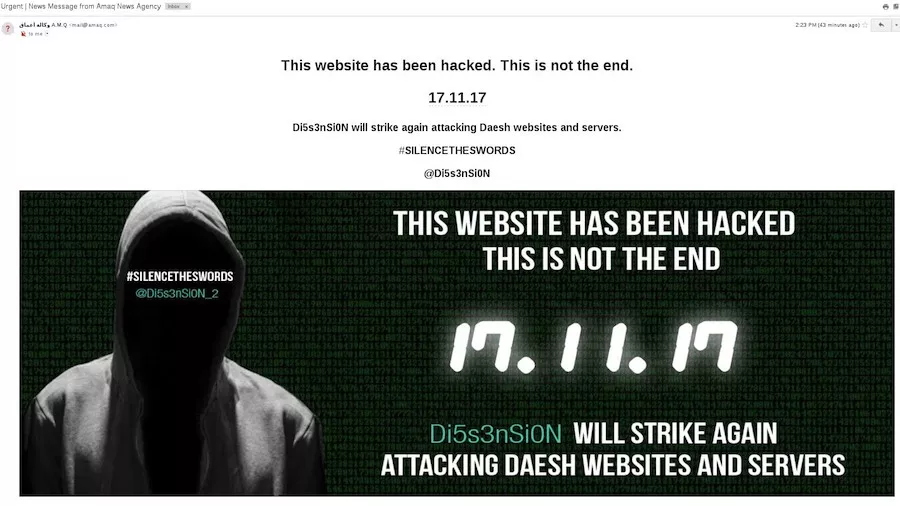
isis hacked by Di5s3nSi0N
The cybercriminals (and their terrorist friends) are, probably, taught to perform their actions in a very covert manner. This means that they don’t openly challenge their opposition. Probably, ISIS propaganda network wasn’t explained how to practice this art.
Amaq is one of the key outlets of ISIS, which issues claims for various terror attacks around the world and updates from different conflicts. This “news agency” has faced numerous cyber attacks from hacktivist and takedowns in the recent times.
Last week, ISIS issued a message and claimed that the security has been increased. “In response to recent events, we have imposed more stringent security measures on our systems,” said the email in Arabic, according to The Independent. “We can now handle email attacks or any type of hack.”
Following this, a Muslim hacking collective named Di5s3nSi0N hacked the email service within three hours. They sent an email to Amaq subscribers with their own logo and warning. The message said that the full secure list of Amaq has been hacked.
Notably, Di5s3nSi0N has disabled Amaq’s services in the past as well. The newly exposed list of subscribers has 1,784 addresses, which were partially verified.
The hacktivist group also wrote on Twitter and shared the update, calling the challenge “too easy.’
Such attacks on the propaganda network of ISIS aren’t new. Due to these crackdowns, Amaq is shifting to encrypted modes of communication and rapidly shifting websites.
Di5s3nSi0N has been carrying out these attacks under the #silencetheswords campaign, which will be completed later this week.
Do you have something to add to this story? Share your views and become a part of the conversation.

What Is A “Certified Android Device”? Here Is How To Check If You Have It

Google Play Protect logo
In the ecosystem of devices running Google’s mobile operating system, “Certified Android Device” is the new buzzword introduced by the company.
As an effort to build users’ trust on the manufacturers and their Android devices, the certification assures that the Android devices they’re purchasing are checked for compatibility and doesn’t include anything malicious.
At the center of the certified Android devices program is Play Protect launched earlier this year, which offers automatic app scanning and ‘Find My Device’ features.
Google says they make sure that Android phones and tablets from their certified device partners stick to Android’s security and permissions models. By running hundreds of tests, the company tries to eliminate the possibility of the devices carrying malware or some adulterated version of pre-installed Google apps.

How to check if you have a certified Android device?

To spot a certified Android at a retail store, according to an earlier blog post by Google, the certified devices would carry a Google Play Protect logo on the packaging.
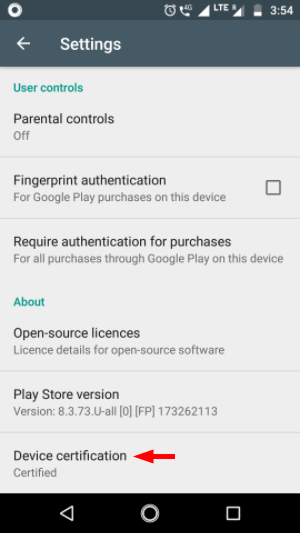
If you already own an Android phone and want to check whether it’s a certified Android device, you can do so within the Google Play app. Go to Google Play > Settings. Scroll down to the bottom of the Settings screen to find the certification details under “Device Certification”.
certified android device how to check
Currently, there are 100+ partners who are making certified Android devices for their markets. The list includes the likes of Samsung, Motorola, HTC, LG, HMD, Xiaomi, etc. You can check the complete list here which includes other not-so-common brands.
The company has also set up a website that flaunts features of the certified Android devices.
Do you have something to add? Drop your thoughts in the comments.

Anonymous Hackers Take Down More Than A Dozen Neo-Nazi Websites #OpDomesticTerrorism

anonymous #OpDomesticTerrorism
Another hacking campaign by the hacktivist collective Anonymous is online; it’s called #OpDomesticTerrorism. And this time, the target was more than a dozen neo-nazi websites collectively taken down by Anonymous groups across the globe, according to a report by IBTimes.
The hacktivist group has taken responsibility for the attacks through a Twitter handle known by the name AnonyInfo. The series of cyber attacks were made as a response to Charlottesville’s Unite the Right rally and the recent White Lives Matter rally, according to a hacker associated with the group who spoke with the publication.
The hacker said that their operation saw global cooperation because it was related to the US. He added that they might consider expanding the operation “to work with Anonymous groups in their own countries” as the “fight against fascism is global.”

Certain groups participating in  have chosen to attack .gov websites as a response to yesterdays terrorist attack. (1/2)
We would like to remind participants the true target is white supremacists and their agenda to terrorize the public. (2/2) 

The list of the websites taken down as a part of the #OpDomesticTerrorism hacking campaign includes:
  • http://cnkkkk.net/
  • http://texasls.org/?nr=0
  • http://northcarolinaleagueofthesouth.com/
  • http://www.marylandls.org/
  • http://www.texasrebelknightskkk.com/
  • http://www.texaskkk.com/
  • http://www.virginials.org/
  • http://cnkkkk.net/
  • https://jewworldorder.org/
  • http://www.basedstickman.com/
  • http://whitehonor.com/
  • https://traditionalistamericanknights.com/
  • https://oathpreppers.com
  • http://njoathkeepers.org
  • http://vanguardamerica.online
The hacker also said that more “continuous attacks” are on the way.

Difference Between Tethering & Hotspot: Which One Is More Secure?

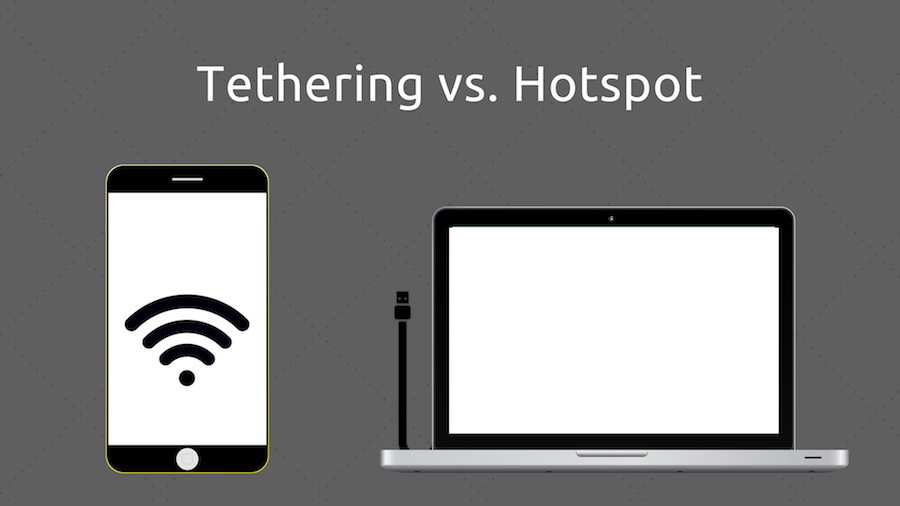
Tethering vs. Hotspot
The evolution of the Internet has triggered massive enhancement in the abilities of humankind to exchange information around the globe. It is a service in itself, and it provides access to many other services. We can access the Internet using different technologies including satellites, cable, telephone wires, wireless or mobile connections. Tethering and Hotspots are two different means of connections, among many others, which we can use while we require connection to the internet.

What is Tethering?

Tethering is the act of accessing the Internet on a computer or device through another computer or mobile phone with cellular network capability. Tethering refers to sharing of internet connectivity between devices. It can be done over wireless LAN (Wi-Fi), Bluetooth or by physical connection using a cable, for example through USB.

What are Hotspots?

Hotspots are wireless access point providing Internet access to devices like computers or smartphones, typically in public locations. It refers to a region where internet connectivity is available and extends to about 30 meters from the device serving hotspot. Devices such as routers, smartphones and also computers act as Wi-Fi hotspots.
Mobile hotspots (a.k.a, portable Wi-Fi hotspots), lets you share your internet connections with up to 5 other devices. Such devices maybe cell phones, tablets, or personal computers.

Security Concerns

Tethering via wired connection is undoubtedly more secure as both the devices are connected through short cables. Connections via hotspot can be intercepted using software such as Wifi sniffers. It is highly recommended to set strong passwords and to use advanced security protocols like WPA2. Tools designed for brute force attacks can easily break into networks that use weak encryption standards like WEP or WPA.
Connecting to public Wifi hotspots is not secure. Just because a hotspot requires a password to connect does not necessarily mean it is secure. Your online traffic may be monitored elsewhere. Also, there is the risk of leaking sensitive information such as your login credentials or credit card numbers.
Also read: Is Your WiFi Router Vulnerable To Hackers? How to Check?

Difference: Tethering vs. Hotspot

Users mostly prefer hotspot over wired tethering, and it has gained widespread usage because almost everything has Wi-Fi built-in nowadays. Wi-Fi hotspots seem more convenient as using the portable Wi-Fi hotspots feature does not require you to have an application installed on your computer or other devices. Moreover, you get simultaneous Wi-Fi internet access for several devices. Whereas, you may require some external software or device drivers for tethering. However, Tethering is relatively cheaper and consumes less battery compared to portable hotspots.
Using your phone as Wi-Fi hotspots is pretty simple; you just need to turn the feature On. A Wi-Fi access point will appear just like a regular wireless access point that your other devices can connect to. It is easy to set up even in Windows 10.
Some mobile network operators restrict the usage of tethering or hotspots and users can only activate it by opting for a data plan that includes tethering. Unlimited data plans generally have these restrictions. This is done because the operators are concerned about the considerable amount of increase in data usage that results from sharing internet.
Did this article help you to develop a clear idea of tethering vs. hotspot? Share your views in the comments below.

Facebook Revenge Porn

Social networks have faced a hard time trying to reduce incidents of revenge porn and users facing embarrassment in public.
Facebook, being the most prominent social network on the web, has developed tools to prevent such content from spreading and get removed as soon as possible.
Earlier this year, Facebook implemented a photo-matching tool in the US to stop sharing of content tagged as revenge porn in the past. Now, the blue network has come up with a new tool that would prevent a person from uploading revenge porn in the first place, according to an ABC report.
And for that, Facebook wants you to upload your nude snaps or videos on Messenger. The company won’t store the images directly but create a hash out of them using the anti-revenge porn tool.
If someone tries to upload explicit content matching that hash on platforms such as Facebook, Messenger, and Instagram, the company won’t allow it.
This seems to be a weird way to demote explicit content, but Facebook’s AI might better protect people if it already knows how they look in natural clothes.
The “industry-first” implementation of the tool is being done in four countries. Australia is one of them where Facebook has collaborated with a federal agency called e-Safety.
“They’re not storing the image, they’re storing the link and using artificial intelligence and other photo-matching technologies,” Julie Inman Grant, e-Safety Commissioner, told ABC.
“So if somebody tried to upload that same image, which would have the same digital footprint or hash value, it will be prevented from being uploaded.”
It’s not the case that every Facebook user would have to upload their nudes. If you fear that you’re a potential victim, you can contact e-Safety who might ask you to send your pictures to yourself on Messenger. Facebook would then store the corresponding hash.

Wednesday, 8 November 2017

How A Developer’s Coding Mistake Has Frozen $280 Million In Ethereum

ethereum bug frozen wallet
What if your access to your whole digital currency pile is restricted due to a person’s fault? What would you do? This isn’t a hypothetical scenario for some people who are holding popular cryptocurrency Ethereum in Parity digital wallet.
Parity has warned users that due to a mistake by code contributor devops199, the library needed to use the multi-signature wallet has been deleted. As a result, multi-signature wallets–the ones which need more than one signature to move funds–are now unusable.
This accident also triggered an old unpatched bug which has converted wallet contract into a standard multi-signature wallet and could enable the contents of a wallet to be erased.
“It would seem that issue was triggered accidentally 6th Nov 2017 02:33:47 PM +UTC and subsequently a user suicided the library-turned-into-wallet, wiping out the library code which in turn rendered all multi-sig contracts unusable since their logic (any state-modifying function) was inside the library,” according to Parity.
It’s worth mentioning that this issue affects the multi-sig wallets that were deployed after July 20. As per the estimation (Via: Engadget), there could be 1 million in ether locked away, which amounts to about $280 million.
This is the second time Parity’s security measures have found themselves under the radar. A couple of months ago, a major bug led to the theft of Ethereum of about $30 million worth.
This development highlights the underlying security issue that affects the wallets and their users. In other words, the security of your cryptocurrency is as reliable as the code that powers your wallet

5 Hidden Tips and Tricks for Google Chrome On Android

G oogle Chrome comes as a default browser installed on most Android phones. It is fast, responsive and comes with all the basic features...