COPY CODE SNIPPET

All contents

Friday, 24 November 2017

Hey, Coders! Google India Is Offering 130,000 Free Developer Scholarships — Here’s How To Apply

google scholarships india
In September, Google announced a partnership with Udacity and Bertelsmann and offered 75,000 Android and web scholarships. While these scholarships covered nanodegree programs like Front-End Web Developer, Mobile Web Specialist, Android Basics Nanodegree and Android Developer, they were limited to Europe, Russia, Egypt, Israel, or Turkey.
Now, keeping in mind the potential of growing Indian developer and startup community, the tech giant has announced a total of 130K scholarships for the country. This program follows last year’s Android Skilling Program, which aimed at training two million Indian developers over the course of next three years.

Out of 130K, Google will sponsor 100 thousand scholarships with the help of Pluralsight. The rest 30 thousand will be available on Udacity’s platform.
Different emerging technologies that would be covered in the offered programs are:
  • Mobile and web development
  • Machine learning
  • AR/VR
  • Artificial Intelligence
  • Cloud Platforms
Google will also provide 1,000 full nanodegree scholarships for the 30,000 Udacity scholarships. With the help of Pluralsight’s unique adaptive assessment engine, the skill level and interest of students will be analyzed.

How to grab Google India’s free scholarship?

All the details of the Reskill India program are available on this page of Google Developers website. After visiting the link, you’ll see the first two training programs for India at the top.
You can click on the Learn more and sign up button to visit Udacity and Pluralsight websites and apply. Just fill in the basic details and you’re done with the application.
Don’t forget to share this with your friends and family.

2018 iPhones Could Finally Arrive With Dual-Sim And Superfast Gigabit LTE: Report

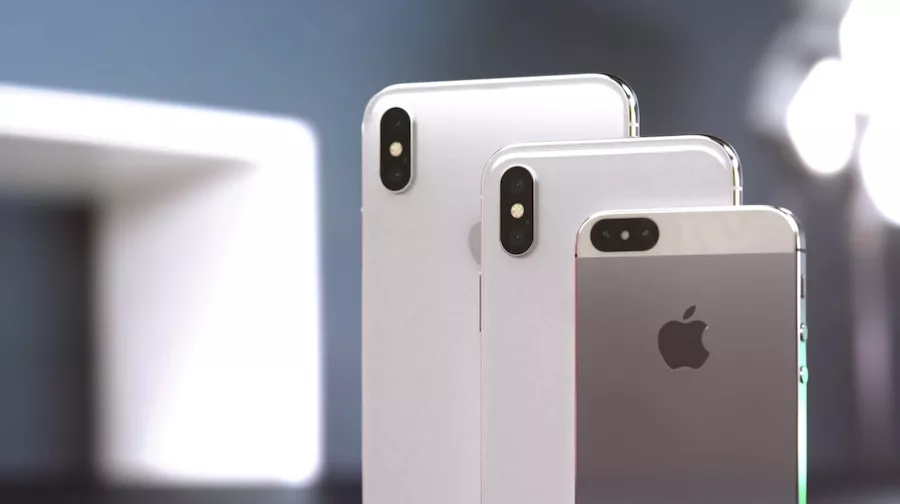
iphone 2018 mocjups
2018 iPhone mockups (Image: Curved.de)
The year 2017 marked one of the biggest changes to iPhone in the form of a full-screen design that ditched Touch ID and brought Face ID. The next year’s iPhone launch could bring another landmark change in the form of a dual-SIM device.

According to KGI Securities’ analyst Ming-Chi Kuo (Via 9to5Mac), who is well-known in the world of iDevices, Apple could use Intel’s XMM 7560 and Qualcomm Snapdragon X20 modems. This would make way for dual-SIM capability on the device.
These choices will also bring a significant boost in the LTE speeds as they can deliver gigabit LTE speeds, which is equal to 1Gbps downlink. The new chips by Snapdragon and Intel will support 4×4 MIMO technology as compared to 2×2 MIMO technology of 2017 iPhones. Many Android flagships are already shipping with 4×4 MIMO technology.
Kuo’s report suggests that out of the three models predicted by him in an earlier report, at least one would come with dual-SIM dual standby and LTE+LTE connections. This is an exciting development as Apple is already working with Intel on 5G iPhone chips.
Kuo also believes that antenna will play a significant role in next year’s iPhone designs.
For those who don’t know, the earlier report predicted that Apple would launch two OLED iPhones with 6.5-inch and 5.8-inch screens. The third and cheaper model will feature 6.1-inch LCD screen. All three devices are expected to sport a full-screen, iPhone X-like design.

Saturday, 18 November 2017

Firefox Quantum 57 Is Here To Kill Google Chrome: Download For Windows, Mac, Linux

Firefox Quanutm release firefox 57
One of the reasons why people switched from Firefox to Google Chrome was speed. But since the last couple of years, Mozilla is working hard to give back Firefox the position it once had. This is in the form of Project Quantum, Mozilla has changed the soul of their open-source web browser.
The first ever Quantum-fueled Firefox version, Firefox 57, is here for your Windows, Linux, and macOS machines. A lot of work has been done, such as implementing the new CSS engine written in Rust programming language, adding parallel processing capabilities to leverage multi-core CPUs which are a common sight nowadays.
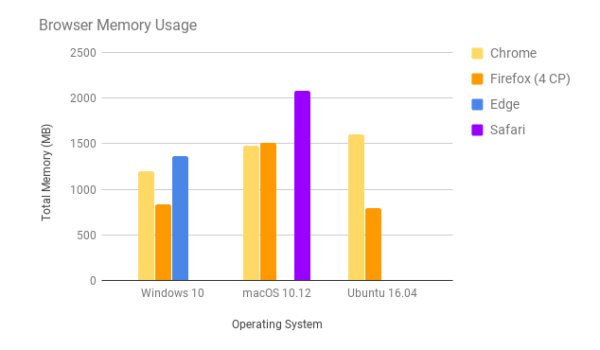
Mozilla says they have doubled Firefox’s speed since last year. Also, Firefox Quantum (Firefox 57) consumes around 30% less RAM than Google Chrome. A new feature called Tracking Protection blocks extensive requests for online user tracking. It works by default in the Private browsing window and reduces the page loading time by around 44 percent.
browser-memory-usage-test
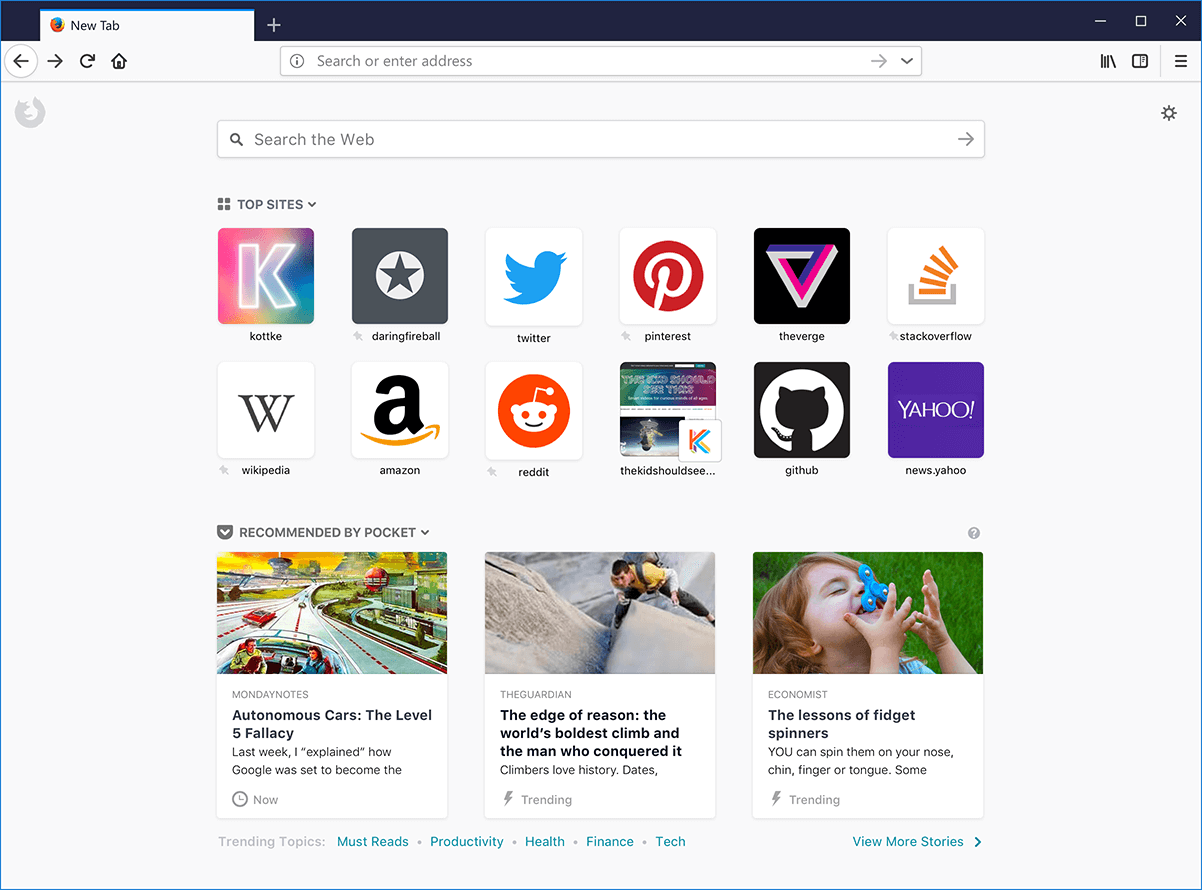
The wave of change isn’t limited to under-the-hood improvements, Firefox 57 now features the Photon UI. It’s simple and sleek, and it gives Firefox users a new feel with its refreshed icons. Firefox 57 also includes an inbuilt tool to take screenshots.
firefox quantum photon UI
Firefox is now worth giving a try, even if you are loyal to your Google-owned browser. The download links for Firefox Quantum or Firefox 57, whatever you would like to call, is available on this page for Mac, Windows, and Linux.
What are your views on Firefox Quantum? Drop them in the comments.

OnePlus 5T Launched: Comes With Bigger Screen, Better Dual Camera, And Face Unlock

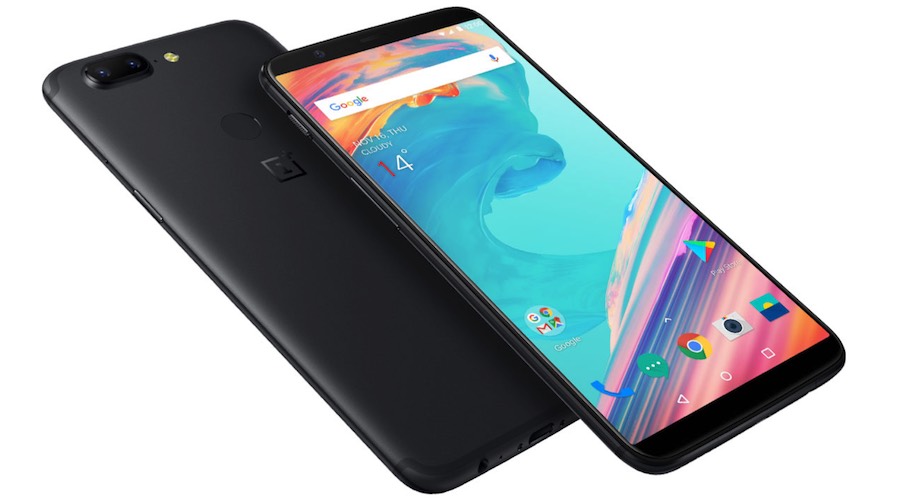
oneplus 5t back
Whenever costly phones like iPhone X or Google Pixel 2 are bashed (here and here) and their alternatives are discussed, OnePlus is always mentioned. In the past few years, the company has amassed a fan base that has found the concept of “Never Settle” impressive.
Continuing its tradition of bringing amazing features at an unbeatable price, the company has, today, launched OnePlus 5T smartphone.

OnePlus 5T Features and Specifications

OnePlus 5T features a 6.01-inch, 18:9 ratio, 2,160×1,080 pixels, Full Optic AMOLED display that looks beautiful with the all-aluminum, sleek body. The screen is now taller, which has pushed the fingerprint reader to the back. Overall, you get a bigger screen as compared to OnePlus 5T’s 5.5-inch display but the overall device is of the same size.
oneplus 5t design
Improvements have also been made to the real camera, which now packs a wider-aperture secondary rear camera. Due to the new f/1.7 lens, more light can enter, and you get better photo quality while zooming in. The phone’s 16+20MP cameras are optimized for low-light and portrait photography.
There’s a face unlock option as well. While it might not be as advanced as iPhone X’s FaceID, 5T is the first member of the OnePlus family to get this feature.
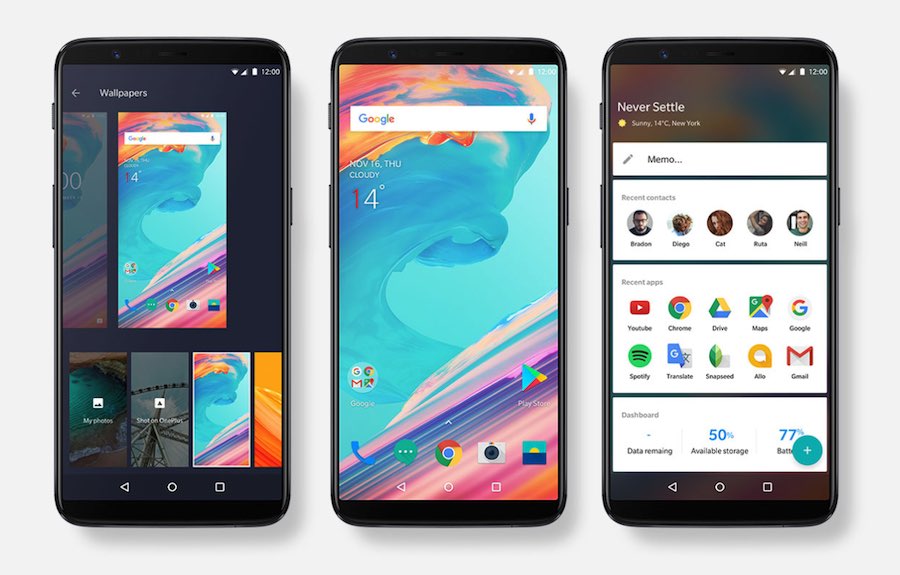
oneplus 5t face unlockThe custom OxygenOS has been updated to the latest version to bring new tweaks to the home screen, more UI customization control, etc.
Talking about the processor, 1.9GHz Octa-core Qualcomm Snapdragon 835 powers the device, which is same as OnePlus 5’s processor. The RAM options are available up to 8GB and the physical storage options are 64GB and 128GB. The device ships with a Dash Charge for a day’s battery in half an hour.
oneplus 5 oxygenos

How much does it cost?

The starting price of OnePlus 5T is $499 for the 64GB version with 6GB RAM. This price is just $20 more than OnePlus 5. The $128GB version with 8GB RAM costs $599.
Did you find this “Flagship Killer” attractive enough? Don’t forget to share your views.

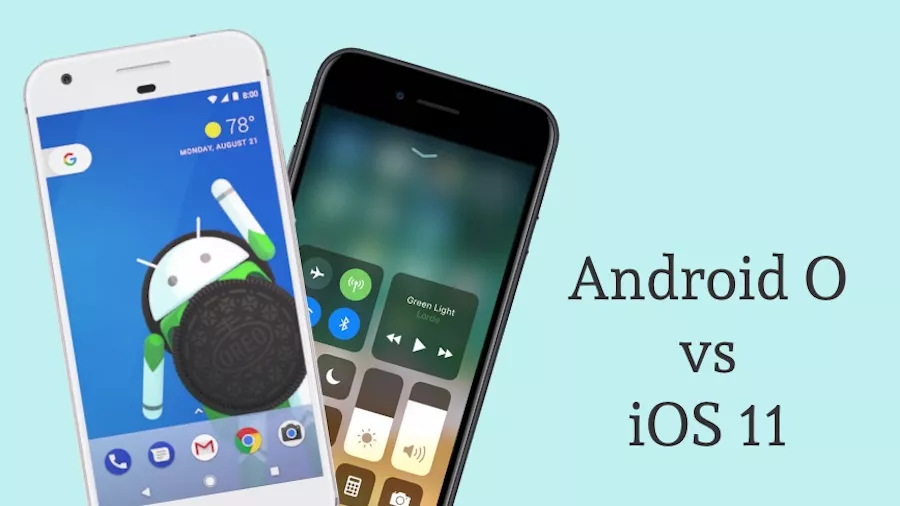
iOS 11 vs Android O Feature Comparison — What’s Hot, Who’s Better

ios 11 vs android o
Both iOS and Android were born around 8-9 years ago. With time, they have matured to become the most popular operating systems. Both Apple and Google are also fighting the smartphone war with the help of iPhone and Pixel devices. That’s why the annual releases of the new versions iOS and Android are always a big event.
While Google has just released Android Oreo to supported devices, Apple is also set to release iOS in the upcoming weeks; you can read its most important features here. Both the upcoming releases are having many features which are already existing on the other platform. So, let’s do a brief Android O vs iOS 11 feature comparison and see who turns out to be a winner. Please note that this is not an “iOS 11 or Android O: Which is better?” debate, it’s just a feature comparison —

Android O vs iOS 11: Comparison

Background Limits

android-m-pictures
The hottest feature of Android 8.0 Oreo is “Background Limits.” Until Android Nougat, Google didn’t limit the number of apps that can run in the background. With Android O, Google is putting restrictions on the background activities of apps. This will improve battery life and performance. Apple has already put heavy restrictions on what apps can do in the background.

Notifications
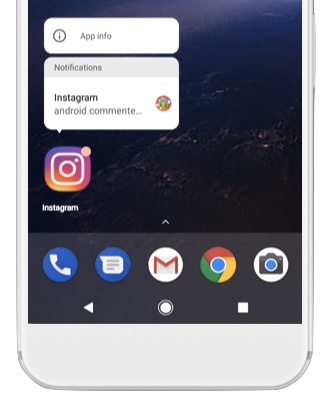
Another great Android Oreo feature comes in the form of heavy improvements in notifications department. In Android 8.0, you’ll notice dot in the top-right corner of the app icon. The number of dots will tell you the number of awaiting notifications. This feature has existed in iOS from a long time. Moreover, just like iOS 3D Touch, a long press on an icon with notification will pop-up a small menu that will show different options.

Drag and drop, smart text selection
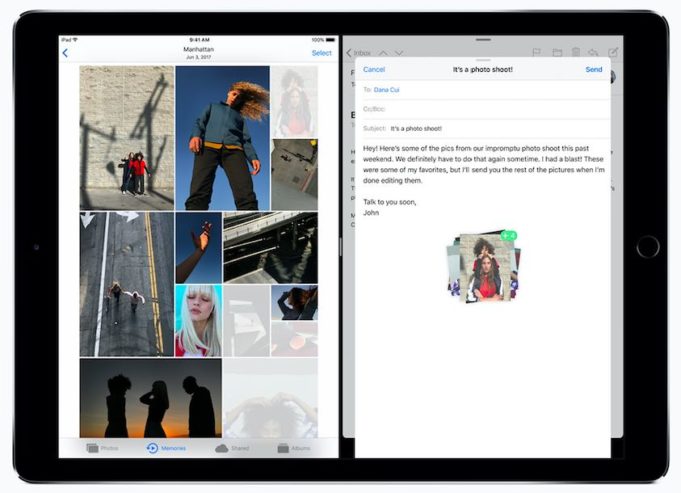
In iOS 11, now you can select a text in the browser (or image, link, etc.) and drag it to another app for pasting. This will make your work easier and consume lesser time while working on bigger screens like iPad. A similar but less advanced feature was already introduced in Android Nougat, which works like a charm.
Android Oreo comes with further improvements in this department. Thanks to a feature called Smart Text Selection, when a user highlights anything, a contextual link (For eg., a Maps link when you copy an address) will open along with standard actions.

Native Screen Recording

iOS 11 is coming with a feature of native screen recording. It’ll allow you to seamlessly record your iPhone screen. It’s a surprising move given the fact that Apple has opposed screen recorder apps in Apps Store since times immemorial. In Android, you can use such apps to record the screen but there’s no in-built functionality.

Autofill API
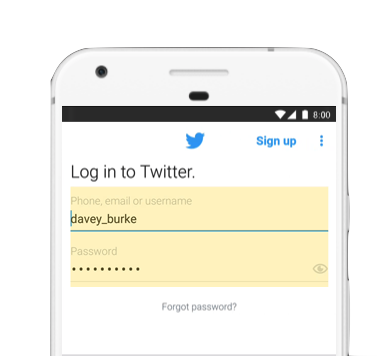
With the new Autofill API feature, you can stop worrying about making secure passwords and having troubles remembering them. With Android O, your phone will get native support for password managers. After choosing a default password manager app, you’ll be able to simply log into your accounts with ease. On the other hand, Apple doesn’t like to give such permissions to third-party apps in the name of security.

Picture in Picture

With iOS 9, Apple brought Picture-in-Picture facility to its devices, but limited it to iPad; the iPhones are still deprived of this feature. Google is going one step ahead and bringing the PiP mode to its smartphones with Android Oreo update. After the update, you’ll be able to minimize a video and make it float off the screen while you complete some other task.

Digital Assistants and AR/VR

Siri on iOS 11 will get the functionality to translate words and phrases to the common languages. It’ll also sound less robotic. Compared to Siri, Google Assistant has an advantage of a wide set of capabilities and better translations.
Talking about AR and VR in this Android O vs iOS 11 showdown, Google has been doing this for a long time with Google Cardboard, Daydream, and Tango. Apple is just getting started with the help of ARKit, but its capable hardware and the developer support for iOS could turn out to be a game changer.

Google Play Protect

Acting to bring a better sense of security to Android operating system, Google has brought Google Play Protect to Play Store. This Android O feature acts as a virus scanner for Android apps and ensures that malicious content doesn’t get installed on your phone.
However, compared to iOS App Store security, Android is still struggling with malware and harmful apps. I hope that Google will continue to improve its security and ensure a better experience.

Cleaner UI

android notification
With each Android release, Google is trying to make its user interface cleaner. The Notification and Settings are much easier to use. Compared to Android O, iOS 11 continues to make its experience even better.

iOS 11 vs Android O: Which one is better?

If you’d take a close look at these features, you’d notice that both Apple and Google are trying hard to surpass each other. While Google is adding new features and bringing goodies to the users, Apple is busy polishing the experience with a redesigned control center and App Store.
Apple could also turn up the heat at its future iPhone launch events as it’s known to save some great features. Google can also do the same with new Pixel devices.
Coming back to the debate of a “better” mobile operating system, today, both iOS and Android operating systems have evolved a lot and become capable of performing all the actions you like. It’s a general tendency among the people to love the ecosystem around themselves and find it easier and familiar. With time, we get accustomed to the apps, workflow, accessories, interfaces, etc., and find another platform alien.
There is a dog-eat-dog competition in the tech world and every “good” technology product is trying to become “better.” In the end, it’s all a matter of personal preference for most of the users who end up finding solace using one platform or the other.
Did you find this Android O vs iOS 11 comparison helpful? What’s making you more excited? Don’t forget to share your views in the comments section.

What Is Teletype For Atom? How To Code With Fellow Developers In Real Time?

In a short period of three years, GitHub’s open source code editor has become one of the most popular options around. In our list of top text editors for Linux, Atom was featured at #2. From time to time, GitHub keeps adding new features to this tool to make it even better. Just recently, with the help of Facebook, GitHub turned Atom into a full-fledged IDE.
As GitHub is known to host some of the world’s biggest open source collaborative projects, it makes perfect sense to add the collaborative coding ability to Atom. To make this possible, “Teletype for Atom” has just been announced.

What is Teletype for Atom? Why was it created?

A little history first — Teletype, in the early days of computing, was used to create a real-time circuit between two machines. As a result, anything typed on one machine appeared on the other without any delay.
Such type of physical connection isn’t possible in today’s world where developers collaborate and create new and amazing things while being thousands of miles apart. While cloud-based IDEs and remote tmux sessions let you shift your entire workflow into a hosted environment, it’s not possible all the time. Moreover, the connection latency in such methods could lead to a frustrating experience.
To solve this problem, GitHub has launched Teletype for Atom. In GitHub’s own words: “It wires the keystrokes of remote collaborators directly into your programming environment, enabling conflict-free, low-latency collaborative editing for any file.”

How to use Teletype for collaborative coding?

To get started with this new tool, you need to have it installed in Atom (Atom 1.22 or newe). You can either install the Teletype package  from Atom’s setting view (Cmd+ or Ctrl+) or run the following command:
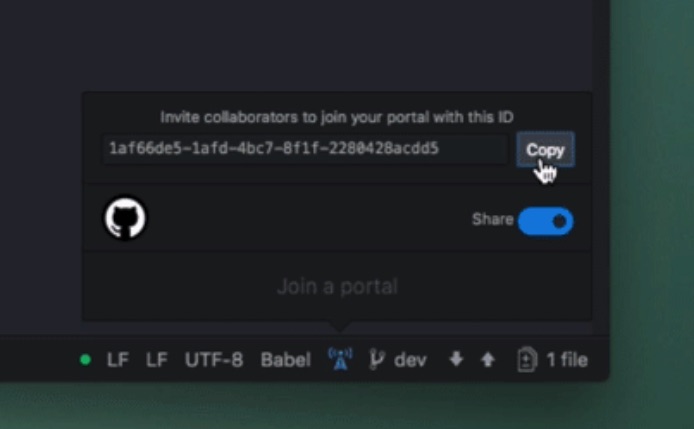
After doing so, you’ll need to click the portal/antenna icon shown below in the Atom status bar. Flip the share button to get the sharing ID.
share a portal github teletype
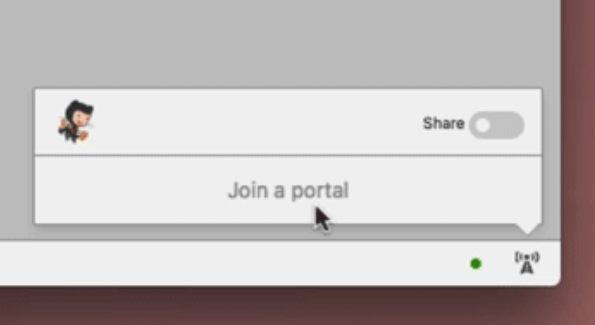
Now share the secret ID via any chat service. Once a person gets your portal ID, they can click the antenna icon in their Atom editor and further click on “Join a portal.” There, paste they the secret ID, and it’s all done. The portal opens, and all collaborators can edit the code in real-time.
join a portal github teletype
It’s worth noting that Teletype for Atom uses WebRTC to encrypt all communications between the collaborators.
Did you find this new feature of Atom exciting? Give it a try and share your feedback with us.

Uninstall “Windows Movie Maker” Scam Right Now, Third Biggest Threat Spotted By ESET

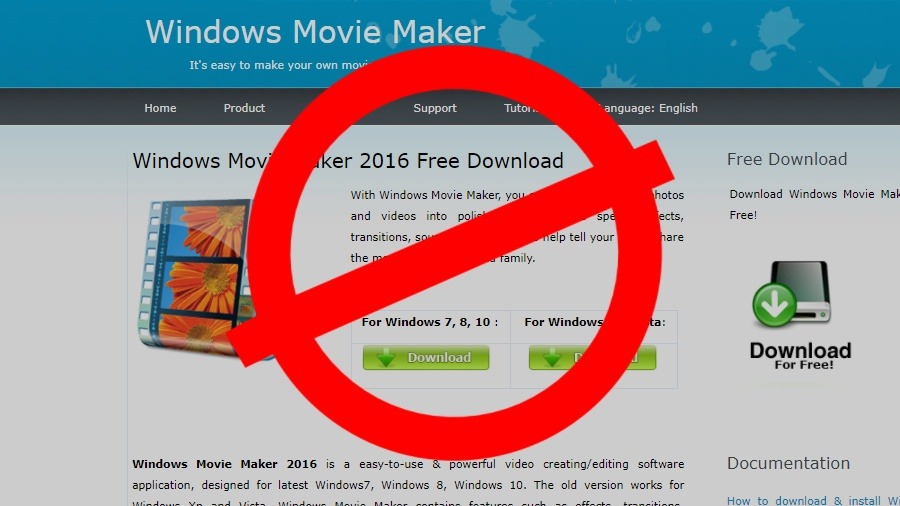
Windows movie maker scam main
Microsoft has abandoned their simple free video editing software and introduced Story Remix. But still, there are people on the planet who have contributed to around 10 million Google searches for the keywords “movie maker” and “windows movie maker.”
Microsoft officially removed Windows Movie Maker from their download website in January. Earlier, the free video editing software was available as a part of Windows Essentials. It saw its last stable release in 2012, almost 12 years after it was first introduced in 2000.
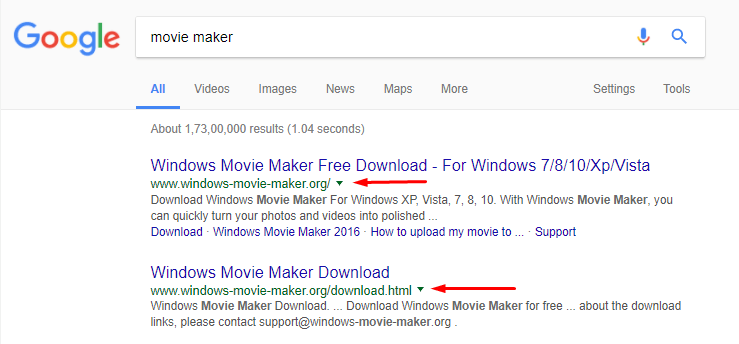
Now, when you search for the software, the results include the official link to a scam that’s meant to rob $30 out of your pocket.
The software available on the website “www[dot]windows-movie-maker[dot]org” looks almost similar to Windows Movie Maker. There is nothing fishy when you download and install the scam software. But when you try to save a file, it asks a $30 upgrade fee for the full version. If you click the ‘Buy Now’ button, you’ll be taken to a download page where you realize you have been given a discount of 25%.
The payment prompts are displayed multiple times. First, when you download the software, and later it prevents you from saving a file.
The links to the scam website were still visible in Google Search results at the time of writing.
Windows Movie Maker Scam
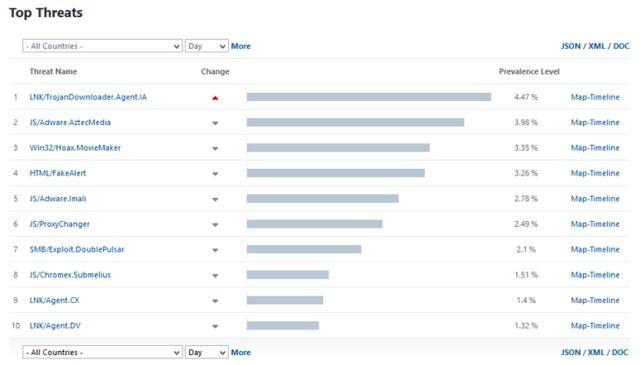
The Windows Movie Maker scam was discovered by the antivirus company ESET last week, which called it the third largest threat they are monitoring worldwide on November 5, identified as Win32/Hoax.MovieMaker. A day later, ESET’s telemetry recorded detections in Phillippines, Israel, Finland, and Denmark.
However, the software in question is not known to put any malware or lock innocent users out of their computers. ESET has informed Google and Microsoft about the fake Windows Movie Maker in existence.
A statement from Microsoft only warns users about being vigilant while downloading apps. “As always, we recommend customers use caution when downloading apps or programs from sites that aren’t known or reputable,” a spokesperson said in an email.
windows movie maker scam threat
Image: ESET

Remove Windows Movie Maker scam

A source close to Microsoft informed Fossbytes that the website “windows-movie-maker[dot]org” is of malicious nature. So, if you have accidentally downloaded the Windows Movie Maker scam in search for Microsoft’s free editor, go to the Control Panel > Programs & Features and Uninstall the software right away. Also, scan your computer using some well-known anti-malware software for extra safety.
As an alternative to Windows Movie Maker, you can use another Microsoft app called Movie Moments, or if you’re running the Windows 10 Fall Creators Update, try Story Remix.
To prevent scams like these, one needs to be attentive while downloading something from the web. We should make sure the download source of an app is either official or some highly trusted website.

5 Hidden Tips and Tricks for Google Chrome On Android

G oogle Chrome comes as a default browser installed on most Android phones. It is fast, responsive and comes with all the basic features...